class: title-slide # Laser Cutting <div> <img src="./img/laser-general/laser-logo.jpg" alt="Import" style="height:450px" /> </div> --- class: default-slide # Laser <br> <div class="center" > Light Amplification by Stimulated Emission of Radiation </div> <br> <div class="center" > <img src="./img/laser-general/laser-logo2.jpg" alt="Import" style="height:300px" /> </div> --- class: default-slide ## Principles <div class="center" > A concentration of energy that will burn the matter. </div> <br> .two-columns[ .column[ <div class="center" > <img src="./img/laser-general/laser-principles.jpg" alt="Import" style="height:350px" /> </div> ] .column[ - Perpendicular to the surface (2D) - Enables the cutting or engraving of thin materials - Laser beam = work is carried out at the focal point <br> (focus point) ] ] --- class: default-slide # Safety <div class="center" > <img src="./img/laser-general/security.jpg" alt="Import" style="height:450px" /> </div> ??? Make them think of the 3 main security points they need to have in mind 1. Fire 2. Smoke 3. Laser --- class: default-slide ## Fire risk <br> - I **keep an eye on the materials** whilst they are being cut - I know where the **fire extinguishers** and **fire blankets** are - I know where the **emergency stop button** is <div class="center" > <img src="./img/laser-general/security-material.jpg" alt="Import" style="height:250px" /> </div> --- class: default-slide ## Toxic fumes <br> .two-columns[ .column[ - I **don't cut just anything** - I always **switch on the extractor** fan / filter - I **keep an eye on the smoke** whilst cutting ] .column[ <div class="center" > <img src="./img/laser-general/extraction.jpg" alt="Import" style="height:350px" /> </div> ] ] --- class: default-slide ## Laser <br> - I put on the special **safety goggles** <!-- Should find a nice photo <div class="center" > <img src="./img/laser-general/extraction.jpg" alt="Import" style="height:350px" /> </div> --> --- class: default-slide ## Materials #### Permitted materials - Acrylic (PMMA/Plexiglas) - Untreated wood - Plywood (multiplex) - Textiles - Paper, cardboard ⚠ **Warning!** Corrugated cardboard with 3 layers (or more) can **catch fire** easily! ⚠ <br><br> Thickness: 4 mm maximum --- class: default-slide ## Materials .two-columns[ .column[ #### In small quantities - MDF - ABS, Polystyrene (PS) - PE, PET - Polypropylene (PP) - Polycarbonate (PC), Nylon (PA), Polyurethane (PU) - Fibre-reinforced composites ] .column[ #### Reasons - clogs filters quickly - not optimal to be laser cut ] ] Thickness: 4 mm maximum --- class: default-slide ## Materials .two-columns[ .column[ #### Prohibited - Other MDF - PVC - Copper - Teflon (PTFE) - Phenolic resin, epoxy - Vinyl, imitation leather - Animal leather ] .column[ #### Reasons - High toxicity - Cannot be laser cut with normal lasers ] ] --- class: default-slide # Wavelength <div class="center" > <img src="./img/laser-general/frequency.jpg" alt="Import" style="height:550px" /> </div> --- class: default-slide # Working steps .two-columns[ .column[ #### 1. 2D Modelling - Vector drawing - Colors ] .column[ #### Programmes - Inkscape - Illustrator - FreeCAD (2D export) - AutoCAD - ... #### Method - Export/Save as .SVG - No white space - Be careful with the scale! ] ] --- class: default-slide # Working steps .two-columns[ .column[ #### 1. 2D Modelling - Vector drawing - Colors ] .column[ #### Color is used to define: - speed and power settings - a specific command - the order we want to cut the design ] ] --- class: default-slide ## Working steps .two-columns[ .column[ #### 2. Materials - Size of the material - Thickness - Safety ] .column[ #### Influence - laser cutters have a given working area - the design, particularly where objects fit together - the robustness of the design - strength ] ] --- class: default-slide ## Working steps .two-columns[ .column[ #### 3. Choose your parameters - Mode (engraving / cutting) - Speed/Power ] .column[ ] ] --- class: default-slide ## Operating modes | Cutting | Vector engraving | Surface engraving | | --- | --- | --- | | Burns through the entire thickness of the material | Burns only the surface | Burns only the surface | | Line = vector | Line = vector | Solid surface | | | | | | | | | | 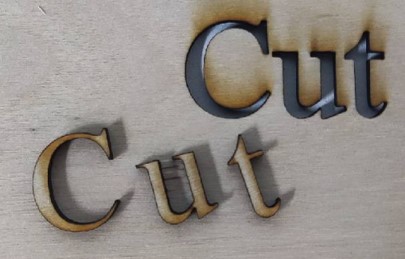 |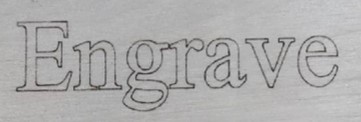 |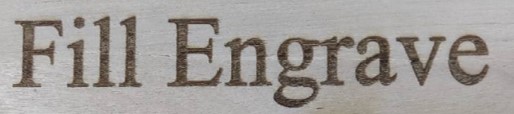 | --- class: default-slide ## Speed / Power Parameters The variables we can play with are the Speed and the Power <div class="center" > <img src="./img/laser-general/speed-power-table.jpg" alt="Import" style="height:450px" /> </div> --- class: default-slide ## Speed / Power Parameters .two-columns[ .column[ <div class="center" > <img src="./img/laser-general/speed-power-demo1.jpg" alt="Import" style="height:250px" /> </div> ] .column[ <div class="center" > <img src="./img/laser-general/speed-power-demo2.jpg" alt="Import" style="height:250px" /> </div> ] ] .two-columns[ .column[ #### How to choose - Sharpest image - Least burnt - Fastest ] .column[ <br><br><br> Note: <br> In some laser cutters the pressure of the compressed air can be regulated. This can influence the cutting process. ] ] --- class: default-slide ## Working steps .two-columns[ .column[ #### 4. Cutting - Manual focus - Autofocus <div> <img src="./img/laser-general/focus-example.jpg" alt="Import" style="height:250px" /> </div> ] .column[ <br> <div class="center" > <img src="./img/laser-general/focus-chart.jpg" alt="Import" style="height:350px" /> </div> ] ] --- class: default-slide # 2D and 3D We cut out 2D shapes, but this does not prevent us from making 3D objects However, it usually requires assembly using interlocking joints <div class="center" > <img src="./img/laser-general/3D-objects.jpg" alt="Import" style="height:350px" /> </div> Useful site for generating [box](https://boxes.hackerspace-bamberg.de/) designs. --- class: default-slide # Kerf ##### Burning = loss of matter .two-columns[ .column[ - Depends on the thickness - The material (fire resistance) - Speed-power ratio ] .column[ - Number of cycles - Depends on the focus ] ] <div class="center" > <img src="./img/laser-general/Kerf-theory.jpg" alt="Import" style="height:300px" /> </div> --- class: default-slide ## Kerf tests <div class="center" > <img src="./img/laser-general/Kerf-theory2.jpg" alt="Import" style="height:300px" /> </div> --- class: default-slide ## Kerf tests <div class="center" > <img src="./img/laser-general/kerf-test-1.jpg" alt="Import" style="height:250px" /> </div> <div class="center" > <img src="./img/laser-general/kerf-test-1b.jpg" alt="Import" style="height:250px" /> </div> --- class: default-slide ## Kerf tests <div class="center" > <img src="./img/laser-general/kerf-test-comb.jpg" alt="Import" style="height:200px" /> </div> The laser beam has a certain thickness, which must be taken into account when joining parts together --- class: default-slide # Useful Site & Apps <br><br> - Boxes.py - Deepnest.io --- class: default-slide ## [Boxes.PY](https://www.festi.info/boxes.py/) Create boxes (and other designs) quickly. .two-columns[ .column[ <div> <img src="./img/laser-general/boxes.py.jpg" alt="Import" style="height:490px" /> </div> ] .column[ <div> <img src="./img/laser-general/boxes.py-2.jpg" alt="Import" style="height:490px" /> </div> ] ] --- class: default-slide ## [Deepnest.IO](https://deepnest.io/) <br> Optimizes cutting path resulting in quicker cutting. <br> <div class="center" > <img src="./img/laser-general/deepnest.jpg" alt="Import" style="height:300px" /> </div> --- class: default-slide # Maker Rule <div class="center" > <img src="./img/laser-general/maker-rule.jpg" alt="Import" style="height:500px" /> </div> --- class: title-slide # FabLab's Specific Laser Cutters <br><br><br><br> For the Laser Cutters specific to our FabLab see the following [Slides](https://fablab.ulb.be/slides/laser-our.html) <br><br><br><br> For issues and improvements you can contact us at fablab@ulb.be